

Visual notes help you remember more, and others enjoy them. You can also use visual notes when you communicate, teach, and inspire others and you can visualize anywhere.
Visualization results in increased attention, more interaction, and better recall. When you are in a situation where you are incorporating visual notes into conversations, often others will engage and suggest elements to add and may even try creating visual elements themselves.
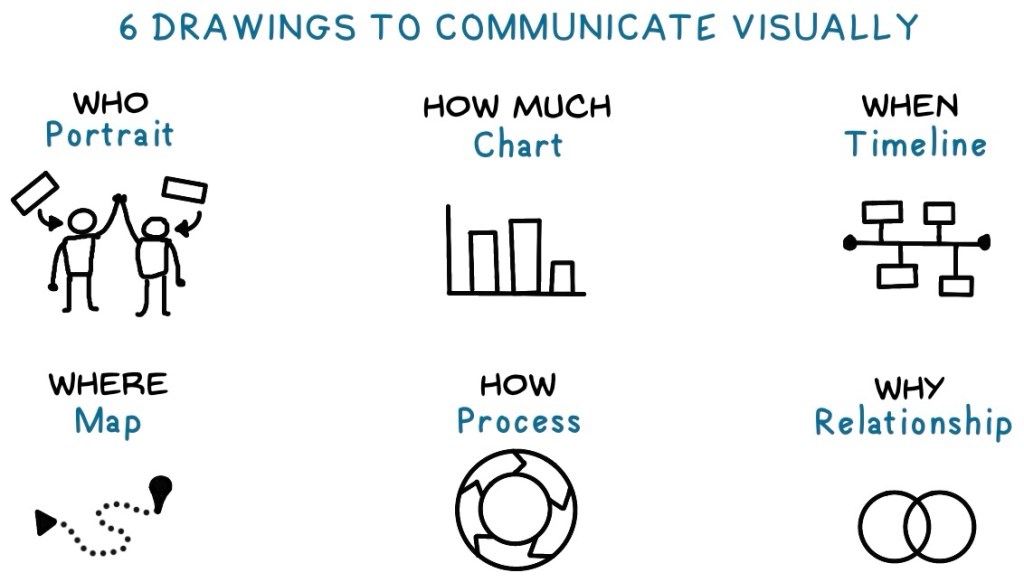
Drawing to communicate visually
Use these types of drawings, based on the classic who-what-when-where-why-how model, to engage with others through visual notes. You don’t need to use all of these in every situation, so think of this as a toolbox of options. You may also be able to incorporate these into the visual notes you take for yourself.
When communicating with others using visual notes, remember these tips.
- Always have tools ready to visualize information. You don’t need anything fancy—just basic tools like paper and pen, a tablet and stylus, or a whiteboard and marker. While a whiteboard isn’t exactly pocket-sized, you can always keep a pen and paper (or index cards) handy for quick visual notes.
- Ask for input while you draw. Engage others by asking questions as you create your visual notes. Once you establish the purpose of a visual, invite open-ended responses from your audience—whether it’s one person or a group. If you’re sketching a donut chart of how you spend your workday, you might ask, “How does my day compare to yours?” If mapping out a customer profile, you could ask, “What other categories or groups should we consider?”
- Let others contribute to the drawing. Go beyond asking questions—invite others to co-create the visual with you. This not only makes the session more interactive but also helps solidify key ideas. Ask participants to use a different color when adding their own elements or notes to the visual.
- Share the final visual notes. Capture your completed notes with a photo or scan and share them via text or email. Many devices offer quick sharing options, like AirDrop on Apple devices, making it easier than ever to distribute the visuals.
- Review your visual notes together. Since these notes were created collaboratively, they serve as a great reference for future discussions. Unlike traditional meeting minutes—often tedious to revisit—visual notes result in immediate engagement and make reviewing past discussions more interesting.
Look At My Notes
This post is from Look At My Notes! How to take and share visual notes. It is available at Amazon.com.
Visual notes consist of text and graphical elements arranged to enhance learning. Because emphasizing content visually makes it memorable, visual notes are ideal for learning, training, and handouts.
In Look At My Notes you will learn (1) how to take and share visual notes with others, (2) why visual notes are effective, and (3) what to include in your visual notes.
 Notes For Learning